Skip to content

Rules, moves, and strategy

How to play Linguicity

The board feels familiar. The language-changing strategy is entirely new.

Start with the two-minute version, then explore any part of the game in detail.

Your first game in six steps

  1. 1

    Choose an opponent.

    Play a person or select one of three bot difficulty levels.

  2. 2

    Choose your languages.

    Use one language or several. Human games must include at least one language both players share.

  3. 3

    Check the Language of Play.

    The highlighted language tells you which dictionary applies to the current turn.

  4. 4

    Build and submit a word.

    Place tiles across or down, connect to the board, and submit the completed word for validation.

  5. 5

    Use the special squares.

    Letter and word bonuses increase your score. Crossing a CL square lets you choose the Language of Play for the next turn.

  6. 6

    Keep the game moving.

    Play a word, pass, swap tiles, chat with a human opponent, and return when it is your turn again.

The rule to remember: the Language of Play applies to the word you are submitting now. A CL square changes the language for the next turn.

Chapter 1

Choose how you want to play

Start a human game with a friend, a former opponent, a suggested player, or someone you find through search. Human games are asynchronous, so each person can make a move when it suits them.

For solo play, choose Beginner Bliss, World Wanderer, or Linguistic Luminary. Each bot offers a different level of challenge, and the same language rules still apply.

Strategy tip: Start with a bot when you want time to learn the board without waiting for another player.

Chapter 2

Choose one language or make it multilingual

A single-language game plays like a familiar word-board challenge. A multilingual game adds the possibility that the Language of Play will change from one turn to the next.

Human opponents need at least one selected language in common. You can choose from the shared options before the game begins. European Portuguese and Brazilian Portuguese appear separately because they use different dictionaries.

English, Spanish, French, Italian, German, European Portuguese, Brazilian Portuguese, Irish, and Scottish Gaelic.

Strategy tip: Choose languages both players enjoy using. A broader game creates more ways to change the board, but every turn still uses only one active dictionary.

Chapter 3

Check the Language of Play before every move

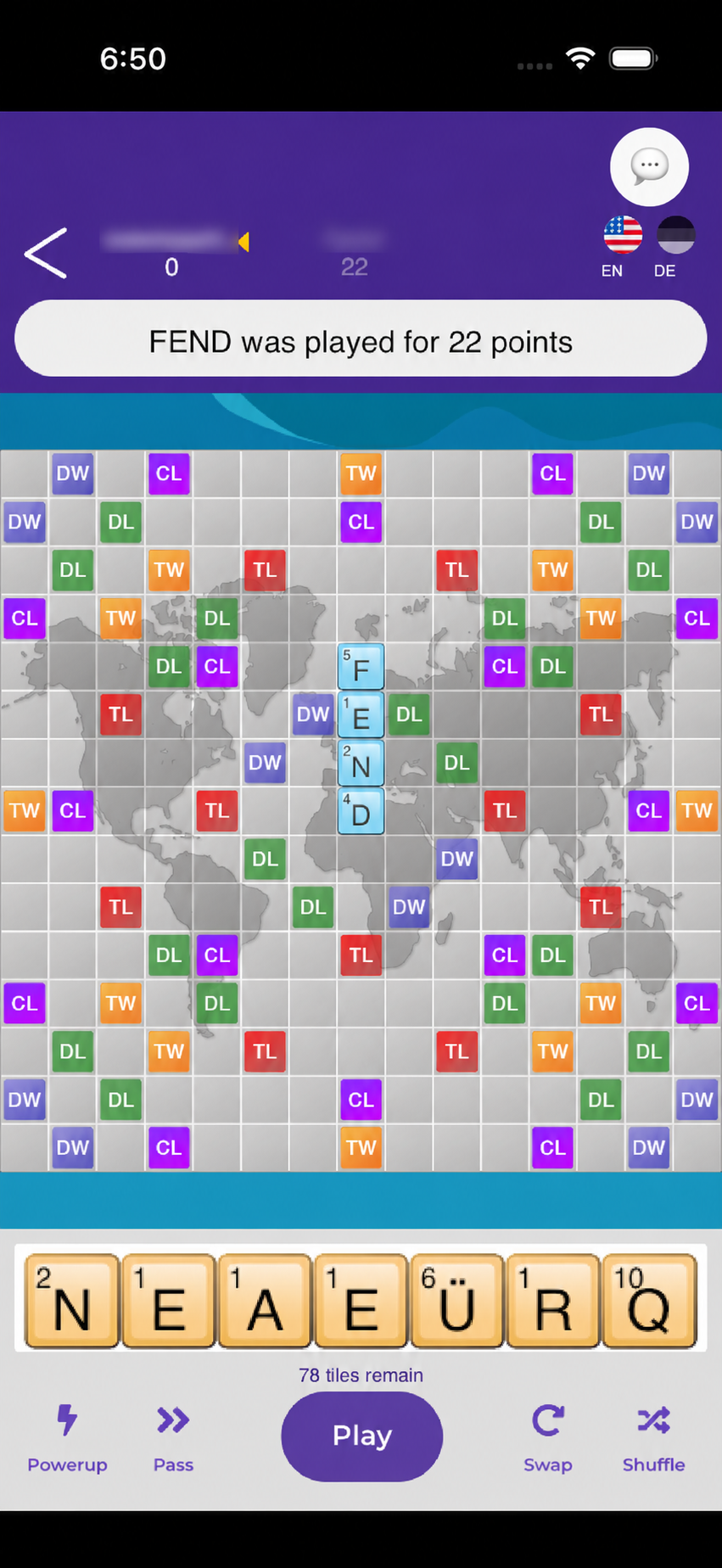
In this real game, English and German are selected. English is shown in color as the active Language of Play, while German is dimmed.
Linguicity board with English active and German selected but inactive

The highlighted Language of Play determines which dictionary validates your word. In a multilingual game, the letters already on the board may come from earlier turns in other languages, but the complete word you submit now must be valid in the active language.

Language-specific characters, including accents and diacritics, can appear in your rack. Treat them as part of the language, not as interchangeable decorations.

If the app says your word belongs to another selected language, you can try a different word, reach for Change Language+, or plan to shift the language on a future turn.

Chapter 4

Build across or down

Your rack holds seven tiles. In the opening move, place a word across the center star. After that, every move must connect with the letters already on the board. Place tiles in one row or one column, then submit the move.

The app checks every completed word created by the move against the current Language of Play. Accepted words add to your score and new tiles refill your rack while tiles remain in the bag.

Use the score squares

Letter values create the base score. Double Letter and Triple Letter squares multiply one tile. Double Word and Triple Word squares multiply the completed word. A Change Language square changes the next Language of Play after the move is accepted.

  • DLDL — Double Letter
  • TLTL — Triple Letter
  • DWDW — Double Word
  • TWTW — Triple Word
  • CLCL — Change Language

Strategy tip: A smaller word in the right place can be more valuable than a longer word with no multiplier—or it can force the next turn into a language that suits your rack.

Chapter 5

Cross a Change Language square

When an accepted word crosses a CL square, choose the Language of Play for the next turn from the languages included in that game. The word you just played is still checked in the language that was active when the turn began.

Changing the language can help you plan ahead, interrupt an opponent's likely move, or bring a different set of words into play.

  1. 1. Language of Play: English
  2. 2. Your word crosses CL
  3. 3. Choose French
  4. 4. Next turn: French

One move, one continuous board

English is active for the accepted move. Crossing CL lets the player choose French, which becomes the Language of Play for the next turn.

Strategy tip: Look at the letters your move leaves open. A language change is strongest when the board and the likely rack both support your choice.

Chapter 6

Use a power-up without giving up your turn

Change Language+

Change the Language of Play to another language in the game without crossing a CL square. Your turn remains active, so you can build a word in the newly selected language.

Swap+

Exchange selected rack tiles without ending your turn. After the swap, use the new rack to make your move.

Power-ups are held in the player's inventory and can be purchased with in-game coins. Premium also provides a free power-up at the start of each game.

Strategy tip: Save a power-up for the turn when a language mismatch or difficult rack would otherwise force a pass.

Chapter 7

When you cannot—or do not want to—play a word

Pass to end your turn without changing your rack. Use a standard swap to exchange selected tiles and end your turn, as long as enough tiles remain in the bag. Swap+ is different: it lets you exchange tiles and keep the turn.

A game can finish when a player empties their rack after the tile bag is empty, when the players reach three consecutive passes, when someone resigns, or after 10 days without an accepted word. The app begins showing an idle indicator after three days so both players can see that time is passing.

When the game ends

The result shows the final scores and winner, keeps the final board available for review, and offers a rematch when one is available. An expired game remains briefly accessible before it is removed.

Chapter 8

Keep the conversation with the game

Human games include chat that belongs to that game. Send a message or choose a positive quick reply such as “Nice word!” or “Well played!” Bot games do not include chat.

After a game ends, chat becomes suggestion-only so players can send a final congratulations. If a conversation is reported, the chat is locked.

Revisit what you played

My Words keeps a history of your played words. Open a word to see English-language definitions when they are available. The Word of the Day can also show every supported language in which that word validates.

A valid game word may not have a definition. Word validity comes from the active language dictionary; definitions are a separate learning aid.

Chapter 9

Turn progress into a board that feels like yours

Complete quests, reach new levels, earn achievements, and collect coins as you play. Rewards can unlock board styles, tile styles, badges, and power-ups.

The monthly leaderboard highlights the top five players. It is a snapshot of the current month, not an all-time ranking.

Now put the rules on the board.

Choose one language or several, find your first word, and let the next turn surprise you.

Still have a question? Visit Support.